Massive OCR at the Edge & RAG Search with Google ADK, Gemma 4, and Cloud Run
Build a production-ready, privacy-first, event-driven OCR and Document Digitalization pipeline using Google ADK, Gemma 4, and Google Cloud Run.
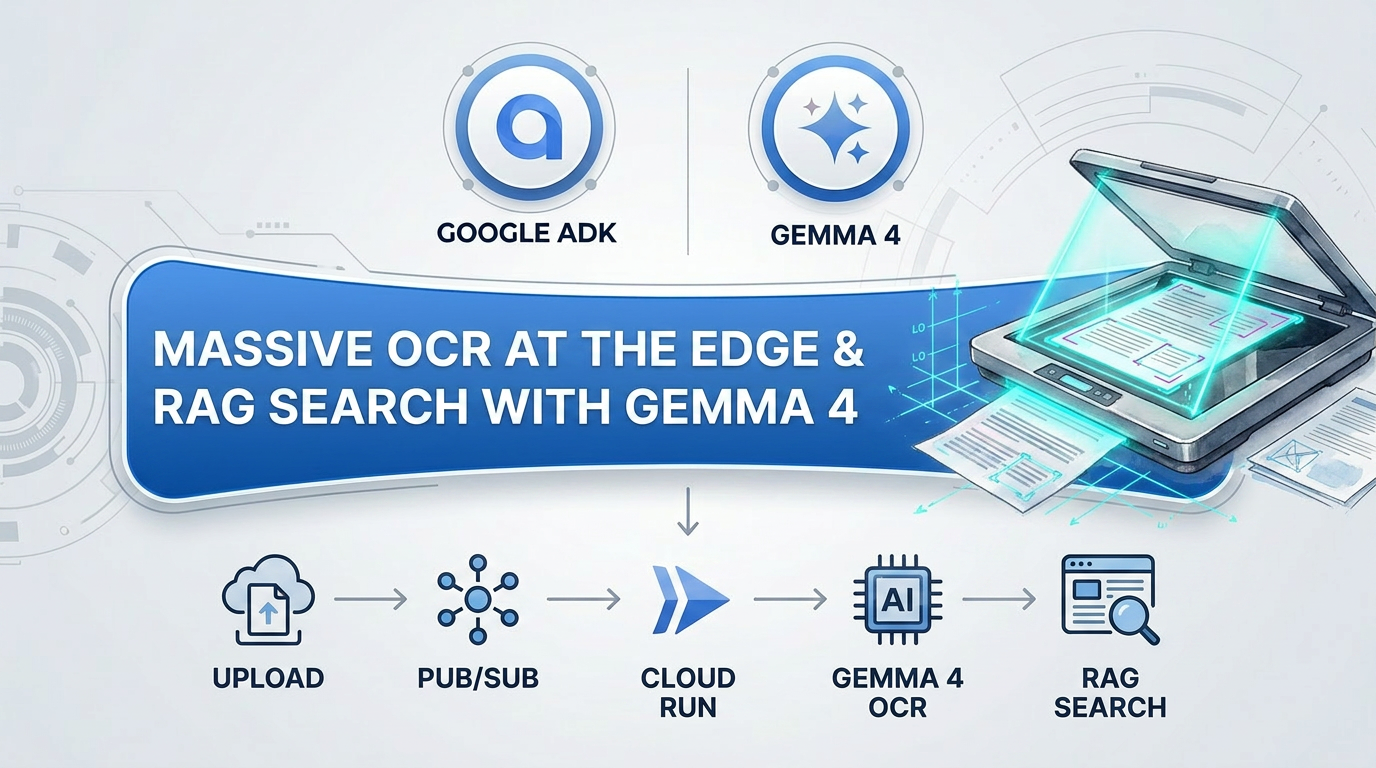
GDG Lisbon - GenAI Community: Massive OCR at the Edge
[!NOTE] 📺 Presentation Slides: View the presentation slides for this meetup here.
Welcome to the Massive OCR at the Edge & RAG Search developer’s manual. This repository contains a production-ready, privacy-first, event-driven OCR and Document Digitalization pipeline built with Google Agent Development Kit (ADK), Gemma 4 / Gemini, and Google Cloud Platform (GCP).
Architecture Overview
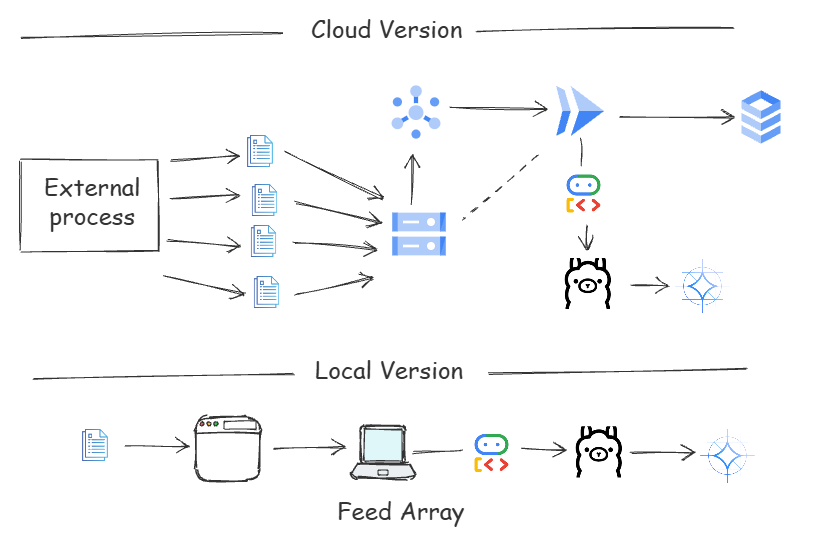
View and edit the interactive architecture diagram here.
The system is split into two primary components:
cloud-run: An event-driven Cloud Run service running on GCP. It triggers automatically when document images are uploaded to GCS, processes them via a specialized Google ADK OCR agent running Gemma 4 (or Gemini), parses structural layout coordinate maps, and saves structured JSON metadata into the GCS output bucket.frontend: A premium React single-page application and Express RAG Search server. It fetches digitized documents from the output bucket, showcases interactive visual layout coordinates on a document canvas, and leverages a multi-tier local/cloud RAG agent to semantically search and highlight coordinates on visual overlays.
Project Structure
1
2
3
4
5
6
7
8
9
10
11
12
13
14
15
16
17
18
19
20
21
.
├── .gitignore                  # Git exclusion rules for dependencies and secrets
├── README.md                   # Project documentation manual (this file)
├── gcp-setup.sh                # Automation script to provision full GCP pipeline
├── launch-local.sh             # Interactive local launcher script for offline demo
├── package.json                # Project root dependency and run scripts
│
├── cloud-run/                  # Event-driven OCR Microservice (GCP Cloud Run)
│   ├── Dockerfile              # Lightweight alpine container build spec
│   ├── agent.js                # ADK LlmAgent & custom Ollama LLM provider definition
│   ├── index.js                # Express service processing Pub/Sub events & writing outputs
│   └── package.json            # Service dependency manifest
│
└── frontend/                   # Frontend Web Application & RAG Server
    ├── ragAgent.js             # ADK RAG Search agent definition & instructions
    ├── server.js               # Express server driving document loading & RAG endpoints
    ├── package.json            # Frontend dependency manifest
    └── public/                 # Static assets served to the client browser
        ├── app.js              # Interactive React single-page dashboard application
        ├── index.html          # Dashboard entry point
        └── style.css           # Premium styling, animations, and typography
Prerequisites
Before getting started, make sure you have the following installed:
- Node.js (v18 or higher)
- npm (installed automatically with Node)
- Google Cloud SDK (gcloud CLI) (required for GCP deployment)
- Ollama (optional): For local/edge execution. Make sure to download and pull the Gemma-4 model:
1
ollama pull gemma4
Quickstart: Launching with NPM Scripts
Convenient NPM scripts have been added to the root package.json to make running, developing, and debugging the project simple:
| Script Name | Command | Description |
|---|---|---|
npm start | npm --prefix frontend start | Launches the RAG Search Frontend and Web Server (port 3000) |
npm run cloud-run | npm --prefix cloud-run start | Runs the local OCR Cloud Run backend emulation server (port 8080) |
npm run adk-web | npx adk web | Launches the ADK Devtools Web Console for debugging agent sessions |
npm run launch-local | ./launch-local.sh | Launches the self-contained offline developer simulation guide and launcher |
1. Launching the Frontend locally
To quickly launch the interactive dashboard and RAG server:
1
npm start
Or use the interactive shell script launcher:
1
npm run launch-local
2. Launching the Local Cloud-Run Emulator
To run the event-driven Cloud Run background processing container emulation:
1
npm run cloud-run
3. Launching ADK Devtools Web Interface
To debug, visualize, and interact with the Agent Development Kit sessions and runs:
1
npm run adk-web
Setting Up & Deploying GCP Infrastructure (Cloud Run)
[!IMPORTANT] Note on Testing: Please note that the Cloud Run deployment and live GCP integration scripts have not been fully tested in a live production GCP environment. The provided scripts represent the target infrastructure architecture design.
A robust automation script (gcp-setup.sh) is provided to provision the entire cloud backend infrastructure.
To deploy the event-driven OCR pipeline on your active GCP project:
1
2
3
4
5
6
7
# 1. Auth and set your active project ID
gcloud auth login
gcloud config set project YOUR_PROJECT_ID

# 2. Grant executable permissions and run the provisioning script
chmod +x gcp-setup.sh
./gcp-setup.sh
Step-by-Step GCP Provisioning Process:
- API Enablement: Automatically enables all required services: Cloud Storage, Pub/Sub, Cloud Run, Artifact Registry, Vertex AI, and Cloud Build.
- Storage Provisioning: Creates two secure GCS buckets in your specified region:
- Input Bucket:
gs://[PROJECT_ID]-bulk-ocr-input - Output Bucket:
gs://[PROJECT_ID]-bulk-ocr-output
- Input Bucket:
- Messaging Topic: Creates a Cloud Pub/Sub topic named
bulk-ocr-uploads. - IAM Configuration: Binds publisher permissions so that the Google Cloud Storage service account can securely publish finalization events to the Pub/Sub topic.
- GCS Event Notification: Configures an automatic bucket notification rule on the input bucket. This triggers a
OBJECT_FINALIZEevent whenever a file is uploaded, publishing its metadata to the topic. - Cloud Run Service Deployment: Containerizes and deploys the
cloud-runnode application to Cloud Run from source. It automatically builds the container using Cloud Build and sets environment variables (OUTPUT_BUCKET,MODEL_NAME). - Pub/Sub Push Subscription: Establishes a Pub/Sub Push Subscription (
bulk-ocr-cloudrun-sub) linking the topic to the deployed Cloud Run service URL, configuring a 10-minute acknowledgement timeout to accommodate large document processing.
Detailed Code Walkthrough
1. cloud-run Event-Driven OCR Agent
Dockerfile: A multi-stage production container utilizingnode:24-alpinefor ultra-small image sizes and faster startup scaling performance on Cloud Run.agent.js:- Extends the Google Agent Development Kit (ADK) by registering a custom
OllamaLlmprovider extendingBaseLlmwhich redirects LLM requests to local Ollama endpoints. - Defines
gemma4_ocr_agent(LlmAgent) with system instructions optimized for high-fidelity OCR, document metadata classification, and layout structural coordinate retrieval mapped as normalized coordinates in[ymin, xmin, ymax, xmax]float ranges (0.0to1.0).
- Extends the Google Agent Development Kit (ADK) by registering a custom
index.js:- Runs an Express web service listening on port
8080(orPORT). - Receives Pub/Sub push messages, decodes the raw event base64 payload to discover the GCS bucket and file names, and downloads the uploaded image to memory.
- Feeds the image bytes to the ADK
ocrAgent. - Parses and cleanses the JSON response from the LLM, sanitizes bounding boxes, and writes both a text-only representation (
.txt) and a structured metadata block (_metadata.json) into the GCS output bucket.
- Runs an Express web service listening on port
2. frontend Interactive Dashboard & RAG Agent
server.js:- Connects to GCS to load all digitized output files or falls back to presentation-safe offline files if credentials are not configured.
- Hosts the
POST /api/searchendpoint driving the RAG (Retrieval-Augmented Generation) Search pipeline. - Multi-Tier Search Execution:
- First tries local Ollama (Gemma 4) to query the consolidated document corpus context.
- Falls back to Google ADK (via a custom
ragAgentsession runner) to answer queries. - Falls back to high-fidelity Fuzzy Search (
performFuzzySearch) for immediate offline demonstration compatibility.
ragAgent.js:- Defines
rag_search_agentusing ADK with highly targeted instructions. It forces the agent to output a single structured JSON block containing a markdown text synthesisansweralongside acitationsarray identifying matching layout coordinate bounding boxes.
- Defines
public/app.js(React client):- Mounts directly to the page using React 18, utilizing on-the-fly Babel transpilation for instant local tweaking without complex webpack configurations.
- Renders a premium Google-themed responsive dashboard with live pipeline metrics, document selection widgets, and search bars.
- Draws interactive, semi-transparent bounding box overlays over the physical document canvas when a search query cites exact page coordinates, giving users immediate visual RAG feedback.
public/style.css:- Designed using modern, premium CSS design tokens. Features background ambient glows, fluid micro-interactions, responsive flex-grid layouts, and state transitions to deliver a spectacular viewer experience.
Presentation & Demo Walkthrough
Once you run ./launch-local.sh, open http://localhost:3000 in your browser:
- Interactive Library: Select documents inside the Digitized Library panel to inspect their OCR full text, classified metadata, and visual coordinates overlay.
- Run RAG Queries: Type natural language questions in the Semantic Search Query bar. Example queries to test:
- “Show me the speaker name in the GDG presentation guide”
- “What is the total balance on my invoice?”
- “Which technologies are used for edge OCR?”
- Interactive Coordinates Map: Click on any of the citations generated by the RAG search. The document viewport will automatically focus and draw a highlighted border around the exact text coordinate cited by the RAG agent!
Credits & Acknowledgements
This project was created for the presentation at the event: GDG Lisbon x Lisbon GenAI Community Meetup.
- GitHub Repository: nuno-joao-andrade-dev/ocr.gemma.series