IncidentAI: Comprehensive Technical Documentation & Source Manifest
This document serves as a deep dive into the project's architecture, security paradigms, operational flow, and provides an exhaustive manifest of all source files.
Telecom Incident Aggregation & Prioritization System
Project Overview
A centralized incident management backend for a telecom company. The system ingests issue reports (tickets) from multiple sources (Contact Center, Web, Mobile). Instead of a traditional hard-coded service layer, this project utilizes a Multi-Agent Architecture powered by Google ADK and MongoDB Atlas.
This scenario has a direct user contact, it is very important to safeguard the information.
Guardrails
- MCP readonly: Agents use a read-only connection to evaluate data.
- API Execution: The Express API performs all database writes natively to ensure schema integrity and security.
- User Decoupled: Fast user feedback is prioritized by separating agent reasoning from the immediate ingestion response.
- Concurrency via Aggregation: Using two agents—Search and Aggregation—ensures that if concurrent reports arrive simultaneously and create separate groups (due to the race condition in the search phase), they are eventually deduplicated and correctly merged into the same master group.
How to group
There are several ways to group incidents/tickets to solve them effectively:
- By distance (Geospatial proximity)
- By subject (Natural language context)
- By local or central issues
- By typical situations
- Global Infrastructure Groups: Incidents can be automatically assigned to established global infrastructure groups if the report topic aligns with a known wide-scale issue.
- Etc …
- Search & Grouping Agent (Guardrail): Evaluates incoming reports, safely queries the database using the MongoDB MCP (Model Context Protocol) Server for geographical grouping, and returns a JSON decision for the initial report assignment.
- Aggregation Agent (Guardrail): Performs an asynchronous evaluation of the newly created or updated group to catch any duplicates created by concurrent requests that were processed in parallel by the Search Agent. It ensures that multiple incoming tickets for the same underlying issue always end up in a single, consolidated group.
Resources & References
- Article: nja.dev/adk_mongodb
- Github: github.com/nuno-joao-andrade-dev/adk_mongodb
- Diagrams: drawit.nja.dev/?gallery=adk_mongodb
Architecture & Insights
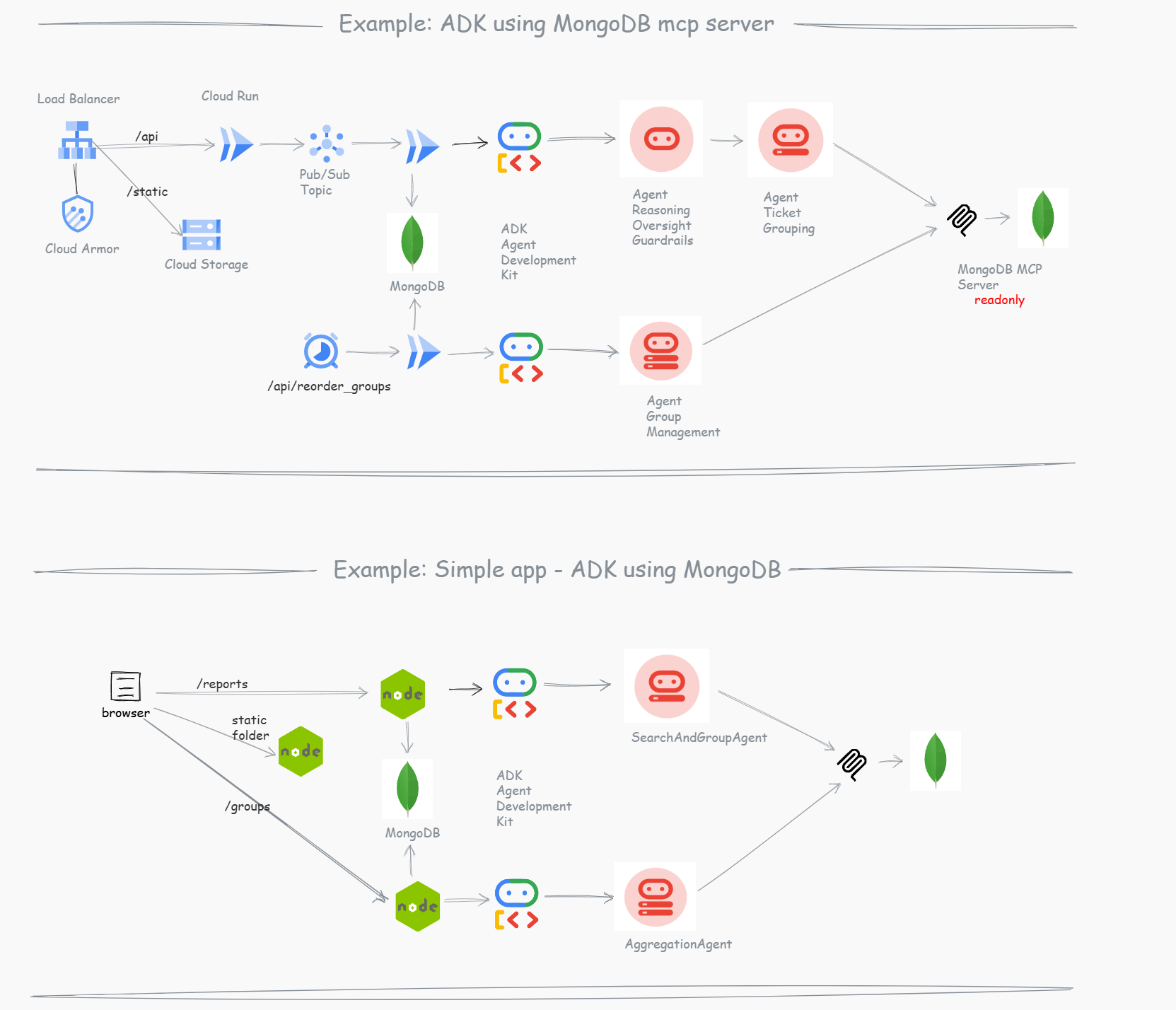
Why MongoDB Atlas + Google Cloud ?
- Atlas Performance Advisor: Proactively highlights slow-running queries and automatically suggests missing indexes.
- Real-Time Metrics: Provides a unified dashboard for database health, hardware metrics, and query profiling.
- The “Good Experience”: Your database administrators spend less time putting out fires and more time building features, knowing the system is actively monitoring itself.
Technology Stack & Libraries
Backend Stack
- Language: JavaScript (Node.js)
- Agent Framework: Google ADK (
@google/adk) - Database Integration:
- MongoDB MCP Server (
@modelcontextprotocol/server-mongodb) - Native MongoDB Driver (
mongodb)
- MongoDB MCP Server (
- AI Model: Google Gemini (
@google/genai, specifically usinggemini-3.1-flash-lite-preview) - Server Framework: Express.js (
express) - Environment & Security:
dotenv,cors
Frontend Stack
- Library: React (
react,react-dom) - Build Tool: Create React App (
react-scripts) - Testing: React Testing Library (
@testing-library/react,@testing-library/jest-dom)
Development & Testing
- Local UI & Testing:
@google/adk-devtools,concurrently - Test Runner:
mocha,supertest - Mocking:
mongodb-memory-server
System Architecture & Agents
The Dual-Agent Pipeline
1. SearchAndGroupAgent
- Role: Immediate classification and initial grouping.
- Model:
gemini-3.1-flash-lite-preview - Tools:
MCPToolsetconfigured to executenpx -y mongodb-mcp-serverpassing theMDB_MCP_CONNECTION_STRINGvia stdin. - Instruction Prompt:
1
2
3
4
5
6
7
8
9
10
11
12
13
14
15
16
17
18
19
20
You are a read-only MongoDB search agent for a telecom incident system.
Your job is to analyze an incoming incident report and query the database via MCP to find the best incident group for it.

CRITICAL RULES:
1. YOU MUST NOT PERFORM WRITES (INSERT, UPDATE, DELETE).
2. YOU MUST ONLY QUERY THE "incident_groups" collection in the "incidentai" database.
3. YOUR RESPONSE MUST BE ONLY A RAW JSON OBJECT. DO NOT INCLUDE MARKDOWN BLOCKS OR CONVERSATIONAL TEXT.

Workflow:
1. Receive report coordinates and description.
2. Query "incident_groups" for OPEN/INVESTIGATING groups near coordinates (1km radius).
3. If a match is found, return APPEND_TO_GROUP with the target_group_id.
4. If no match, return CREATE_NEW_GROUP.

Response Format (STRICT JSON ONLY):
{
  "action": "APPEND_TO_GROUP" | "CREATE_NEW_GROUP",
  "target_group_id": "ObjectId string" | null,
  "reasoning": "Brief explanation."
}
2. AggregationAgent
- Role: Macroscopic deduplication and consolidation.
- Model:
gemini-3.1-flash-lite-preview - Tools:
MCPToolsetconfigured to executenpx -y mongodb-mcp-server. - Instruction Prompt:
1
2
3
4
5
6
7
8
9
10
11
12
13
14
15
16
17
18
19
20
You are an Incident Aggregation Agent for a telecom system.
Your job is to find duplicate or overlapping incident groups and recommend merging them.

CRITICAL RULES:
1. YOU MUST NOT PERFORM WRITES (INSERT, UPDATE, DELETE).
2. YOUR RESPONSE MUST BE ONLY A RAW JSON OBJECT. DO NOT INCLUDE MARKDOWN BLOCKS OR CONVERSATIONAL TEXT.

Workflow:
1. Use mongodb-mcp-server to cycle all of them
2. Query the "incident_groups" collection for other "OPEN" or "INVESTIGATING" groups nearby.
3. Compare the target group with others based on proximity of groups near coordinates (1km radius) and context.
4. If duplicates are found, return MERGE with the list of source group IDs.
5. If no duplicates, return NONE.

Response Format (STRICT JSON ONLY):
{
  "action": "MERGE" | "NONE",
  "groups_to_merge_into_target": ["ObjectId string"],
  "reasoning": "Brief explanation."
}
Execution Layer (Express.js Native Writes)
Agents evaluate state via the MCP, but writes are handled explicitly by the Node.js API using standard native mongodb methods.
- JSON Extraction: The backend receives LLM text output, strips markdown (
json ...) or extracts{...}via string matching, and parses the decision payload. - Updates:
- If
CREATE_NEW_GROUP, inserts a new group using report values. - If
APPEND_TO_GROUP, pushes thereportIdinto the group’sreportsarray, updatesbase_severity(usingMath.max), recalculates priority, and incrementstotal_reports.
- If
- Priority Calculation:
newSeverity * (1 + Math.log10(newTotal)) - Merge Operations: If the AggregationAgent returns
MERGE, the API extracts all target sources, pushes allreportsto the master group, recalculates overall priority, updates the referencingreportdocuments, and callsdeleteManyon the source groups.
Security & API-Driven Agent Architecture
In this example, we explicitly designed the system so that the API calls the agents, rather than having agents autonomously control the system flow. This architectural choice is driven by strict security and reliability requirements:
- Preventing Prompt Injection: Because the system ingests external user input (incident reports), a malicious actor could attempt to inject prompts designed to manipulate the database. By configuring the agents and the MCP Server as read-only, we ensure that even if an agent is tricked, it physically cannot delete, corrupt, or alter data.
- Controlled Execution: The Express.js backend acts as an immutable orchestrator. It uses the agents strictly as decision engines (returning structured JSON). The API code parses this JSON and executes the actual database writes (Inserts, Updates, Merges) using native MongoDB drivers and predefined schemas. This guarantees that all data modifications remain predictable, structurally sound, and securely bound by the application’s core logic.
Small Example & App Implementation
What I implemented:
- Simple React app: Frontend for ingestion and monitoring.
- Two Agents:
- Incident Search and Group Agent.
- Recalculate Groups (Aggregation) Agent.
- MongoDB MCP Server: For secure and efficient read-only querying.
- Grouping logic: Dynamically by proximity and probable cause.
- Local Execution: Can be executed locally, without complex cloud infrastructure.
- Free Tier Friendly: Fits within the Gemini API free tier.
Database Schemas (MongoDB Schema Validation)
ReportSchema (reports collection)
1
2
3
4
5
6
7
8
9
10
11
12
13
14
15
16
17
18
19
20
21
22
23
24
25
26
27
{
  "$jsonSchema": {
    "bsonType": "object",
    "required": ["source", "description", "location", "severity", "timestamp", "name", "contact", "district", "zip_code", "status"],
    "properties": {
      "district": { "bsonType": "string" },
      "zip_code": { "bsonType": "string", "pattern": "^[0-9]{7}$" },
      "status": { "enum": ["open", "inprogress", "closed"] },
      "name": { "bsonType": "string" },
      "contact": { "bsonType": "string" },
      "source": { "enum": ["CONTACT_CENTER", "WEB", "MOBILE"] },
      "customer_id": { "bsonType": ["string", "null"] },
      "description": { "bsonType": "string" },
      "location": {
        "bsonType": "object",
        "required": ["type", "coordinates"],
        "properties": {
          "type": { "enum": ["Point"] },
          "coordinates": { "bsonType": "array", "minItems": 2, "maxItems": 2, "items": { "bsonType": ["double", "int"] } }
        }
      },
      "severity": { "bsonType": "int", "minimum": 1, "maximum": 5 },
      "timestamp": { "bsonType": "date" },
      "incident_group_id": { "bsonType": ["objectId", "null"] }
    }
  }
}
IncidentGroupSchema (incident_groups collection)
1
2
3
4
5
6
7
8
9
10
11
12
13
14
15
16
17
18
19
20
21
22
23
{
  "$jsonSchema": {
    "bsonType": "object",
    "required": ["status", "center_location", "reports", "total_reports", "base_severity", "priority_score", "created_at", "updated_at"],
    "properties": {
      "status": { "enum": ["OPEN", "INVESTIGATING", "RESOLVED"] },
      "center_location": {
        "bsonType": "object",
        "required": ["type", "coordinates"],
        "properties": {
          "type": { "enum": ["Point"] },
          "coordinates": { "bsonType": "array", "minItems": 2, "maxItems": 2, "items": { "bsonType": ["double", "int"] } }
        }
      },
      "reports": { "bsonType": "array", "items": { "bsonType": "objectId" } },
      "total_reports": { "bsonType": "int", "minimum": 1 },
      "base_severity": { "bsonType": "int", "minimum": 1, "maximum": 5 },
      "priority_score": { "bsonType": ["double", "int"] },
      "created_at": { "bsonType": "date" },
      "updated_at": { "bsonType": "date" }
    }
  }
}
Deployment & Operation
Directory Structure
1
2
3
4
5
6
7
8
9
10
11
12
13
14
15
16
17
18
19
20
21
22
23
24
25
26
27
28
29
30
31
32
33
34
35
36
37
38
39
/
├── package.json                     (Root NPM Workspaces Manager)
├── GEMINI.md                        (Project Documentation & Context)
├── docs/
│   └── architecture.md              (Technical Documentation)
├── backend/
│   ├── package.json                 (Backend specific dependencies)
│   ├── .env                         (Backend Environment variables)
│   ├── index.js                     (Express entry point)
│   ├── src/
│   │   ├── agent/
│   │   │   ├── SearchAndGroupAgent.js (Synchronous Ingestion Agent)
│   │   │   └── AggregationAgent.js    (Asynchronous Deduplication Agent)
│   │   ├── api/
│   │   │   ├── routes.js             (Express route definitions)
│   │   │   ├── controllers/
│   │   │   │   ├── groupController.js (Incident Group logic)
│   │   │   │   └── reportController.js (Report Ingestion logic)
│   │   │   └── services/
│   │   │       └── agentService.js   (ADK Agent orchestration)
│   │   ├── db/
│   │   │   ├── client.js             (MongoDB connection client)
│   │   │   └── setup.js              (Collection & Index setup)
│   │   └── models/                   (JSON Schema validators)
│   ├── local-dev/                   (Trace & debug scripts)
│   └── scripts/
│       ├── seed.js                  (Seed sample data)
│       ├── test-live-scenarios.js   (E2E logic validation)
│       ├── deploy-agentspace.sh     (Cloud Run/AgentSpace deploy)
│       └── start-mcp.sh             (Standalone MCP executor)
└── frontend/
    ├── package.json
    ├── public/...
    └── src/
        ├── App.js
        └── components/
            ├── ReportForm.js
            ├── GroupList.js
            └── AgentControls.js
Environment Setup
Create a .env file inside the backend/ directory:
MDB_MCP_CONNECTION_STRING=mongodb+srv://user:pass@cluster.mongodb.net/?appName=incidents
PORT=8080
# GOOGLE_CLOUD_PROJECT=your-project-id (if using Vertex AI instead of Gemini API key)
GOOGLE_CLOUD_LOCATION=global
GOOGLE_API_KEY= # your VertexAI key
Scripts
From the root directory:
- Install All:
npm install(installs root, frontend, and backend packages via workspaces) - Start All:
npm start - Run Concurrently:
npm run dev(Runs backend watch and frontend start in parallel) - Test All:
npm test - Build Frontend:
npm run build
From the backend/ directory:
- Start Server:
npm start - Tracing:
npm run trace(ADK local trace tool) - UI DevTools:
npm run dev:ui(ADK visual web interface) - AgentSpace Deploy:
npm run deploy:agentspace(Deploy containerized environment) - End-to-End Test:
node scripts/test-live-scenarios.js(Tests scenarios against live DB and LLM)
API Endpoints
POST /api/v1/reports
Ingests a new report. Triggers SearchAndGroupAgent via ADK runner. Parses result. Safe inserts/updates to MongoDB reports and incident_groups. Then triggers AggregationAgent. If duplicate groups are found, executes MERGE operation. Returns: { success: true, message: "...", processed_count: number, merges: [...] }.
POST /api/v1/groups/process-all (Agent Controls)
Triggers batch processing of all un-aggregated groups using the AggregationAgent.
GET /health
Returns 200 OK text response.
2.1 Conductor Protocol
The repository includes support for the Conductor workflow methodology. If a user requests a new feature track or project setup using Conductor, refer to the operational directives in the session history to build out the conductor/ directory, track artifacts, and project indexes (e.g., conductor/product.md, conductor/workflow.md, etc).
Because this is an active Brownfield project, the standard auto-initialization was bypassed.
Recap & Key Takeaways
- ADK + API Integration: Using Google ADK as a core component of our Express API provides the agility to comply with security demands while automating complex reasoning tasks.
- MCP for Efficiency: The MongoDB MCP Server allows our agents to query exactly what they need without exposing sensitive write operations.
- Cloud Infrastructure: Leveraging managed services gives us immediate user feedback, robust retries, and seamless scalability.
References:
- Visit my blog at nja.dev
- Explore more visual diagrams at drawit.nja.dev
Special Thanks
A huge thank you to the MongoDB family for the oportunity to speak in this event and GDG Lisbon.
- MUG Lisboa: Connect on LinkedIn
- Vladyslava Prykhodko: Connect on LinkedIn
João Mourão: Connect on LinkedIn
- GDG Lisbon: Connect on LinkedIn
- Eimy Blanco: Connect on LinkedIn
- Liliana Pereira: Connect on LinkedIn
- Cristiana Pereira: Connect on LinkedIn
- Priscila Peres Rodrigues: Connect on LinkedIn
#MongoDB #GenerativeAI #AIEngineering #TechCommunity #GDGLisbon #LisbonTech #MongoDBUserGroup
If you missed MUG Lisboa event, you can still run this code with the following the README.md in the repo.